The writer's problem
A cloud document's version history is being read by some editors as informal evidence of how a piece was written, on the theory that a large block of text appearing in a single save reveals machine assistance while gradual changes over many sessions suggest manual drafting. What that history actually records, according to Google's own help article on seeing what changed in a file and a comparable Microsoft support article on viewing previous versions of Office files, both retrieved 16 September 2026, is narrower than that theory assumes.
What the documents show
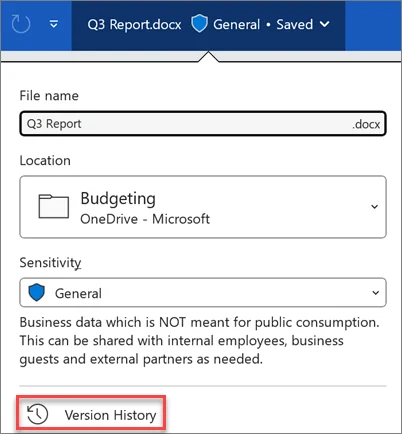
Google's article states a user can hover over Last edit to see who was the last person to update the file and when they last made changes, and can open the full history to browse and restore earlier versions or create a named version. The same article notes a specific gap: some changes might not show up in the edit history, listing examples such as added or deleted rows and columns, formatting changes, and changes made by formulas in spreadsheets. Microsoft's parallel article describes Version History only as letting a user see what changes have been made in a file, compare different versions, or restore the version you want, without stating who made a given change or when, and it notes a personal Microsoft account can retrieve only the last 25 versions. Neither company's documentation describes a field or marker for whether a block of text originated from a person typing or from an AI writing feature; both record access and timing, not how the words were produced.
The editorial choice
Treating a fast, large edit in version history as proof of AI drafting is an inference beyond what either company's documentation supports, since the same history would show an identical pattern for a human writer who pasted in text drafted elsewhere, or who simply wrote quickly. An editor can still use version history usefully, for instance to confirm who had edit access at a given time, but citing it as evidence of authorship method goes beyond what either feature is documented to record.
What stays with the author
If a publisher wants a reliable record of how a passage was produced, the documentation suggests that record has to be kept deliberately, through named versions or a separate note, rather than assumed from the timing pattern the history happens to show. That deliberate record-keeping is the author's or editor's task, not a byproduct either tool provides automatically.
- Does the version history actually distinguish an AI-assisted edit from a fast human edit, or only show timing and editor identity?
- If a named version is used to mark a drafting stage, is that convention documented for future readers of the file?
- What edits does the tool's own documentation admit might not appear in the history at all?
Read as Google documents it, version history is an access-and-timing record, not an authorship detector, and treating it as the latter overstates what the feature is built to show.
Follow the source.
States version history shows last editor and timing, named versions, and lists changes that may not appear in the history.
Source date: Not established · Retrieved: 16 Sept 2026
Describes Office Version History as showing changes and allowing restoration, without stating who made a change, and notes a 25-version retention limit for personal accounts.
Source date: Not established · Retrieved: 16 Sept 2026
Site publication is not established by an event date. Original record ID: 0030-bf-086. This local design review does not change its editorial status.